
Introducing the Divi Accordions Plus Module for Divi and Extra
This module has been developed with a goal to provide the functionality that the native Accordion module of Divi does not have. Some of the main features of the Divi Accordions Plus module are the open/close speed of the toggles, setting initial state of any toggle, using left and/or right icons (fonticon or image options provided as well), using toggle subtitle, etc. Click the button below to find out the complete list of features and view live demos.
Installation
License Activation
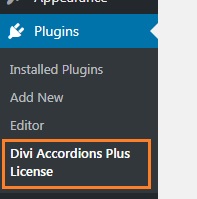
To activate the license go to Plugins->Divi Accordions Plus License page, insert your license key into the license key field, save it and then click the Activate License button.
How To Use
Also this module is built for use with Visual Builder since the Backend Builder will be replaced in the nearest future. It actually works with Backend Builder too but some of the features are not available there.
Adding the Divi Accordions Plus module to pages/posts is done absolutely the same way as with any other core Divi modules.
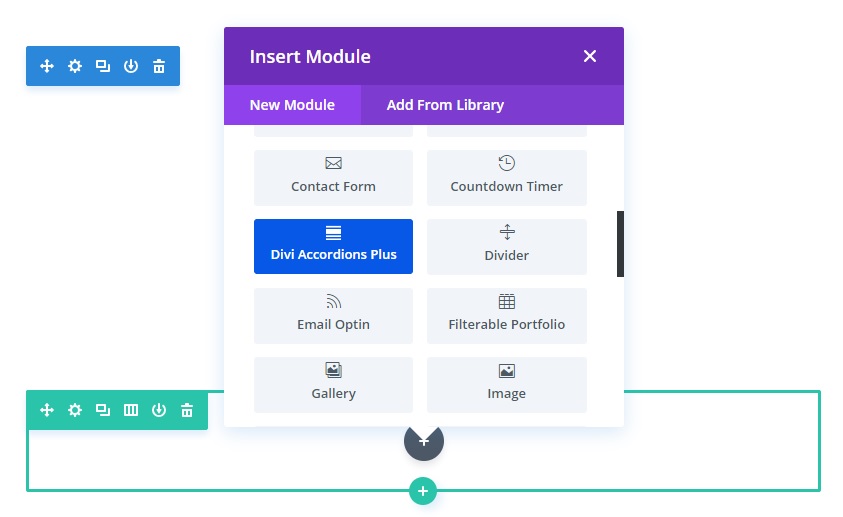
To add it to your content go to Visual Builder and click that dark gray circle which opens the modules list modal.
Then look for the Divi Accordions Plus module in the list of modules, it has a blue background so that you can easily identify it among all other modules.
Try it for FREE!
Hey,
can I use the same Accordeon in three columns? So when I open the first one on the left in column 1 and then open the middle one in column two, does the first one automatically close?
Thank you,
Hi Leonie.
Thanks for your question. The Divi Accordions Plus module allows having only one accordion item open at a time but this feature works for the accordion items within one accordion module and not across all DAP modules used on the page. However, this can be implemented using a simple JS code which I can provide you with if you need.
Hi Paul,
I have a few questions:
1. This module is a compatible with Divi builder 2.4.1 (actual version) in the Divi Theme I actually using?
2. It will appear as a new module in the Divi Theme Builder?
3. It will let me include Pictures (Custom Icons) in the Accordion Title?
4. It will let me star with all accordion closed and automatic closing of one accordion on click of other?
5. If I purchase one site license, and I develop in my localhost, then I can export it to the hosting page (just one runing at the time)?
6. You do not have any more the 7 day Try it for free?
7. Do you have any reimbursement policy in case it is not what I am looking for.
Sorry for all those questions but I am new in Divi and have not much experience in Developing and I am trying to go by the safe way. It seems you do an excellent work adding customization to a Divi function for persons like me that prefer to have all customizable without too much technical knowledge. Thanks in advance!!
Hi Claudio.
Thanks for asking these questions.
1) Divi Accordions Plus module is compatible with Divi and Extra themes starting with v3.1 and v2.1 respectively (if you are using the Divi theme or Extra theme then you do not need to install the Divi Builder plugin, it comes built into these themes)
2) Yes, it will appear as a new module in the Divi Builder
3) Yes, you can add font icons and/or image icons to both left and/or right sides of the accordion item title
4) Yes, you can set the default state of the accordion items(open or closed) individually and choose to have either multiple or a single open item at a time (when you open one item the other one closes)
5) Yes. Activation of the license key on localhost is not counted
6) We used to provide a 7-days free trial period as a sales launch limited time offer but it is not available anymore
7) Yes, we have a Refund Policy. Please read our Terms of Agreement, the Refund Policy is under the clause 12
Let me know if you need any additional information, I’ll be glad to help you.
Is the Accordions plugin compatible with WordPress 5.0?
Hi Jeremy,
yes, Divi Accordions Plus module is compatible with WP 5.0 . Actually, it will be compatible with any version of WordPress as long as Divi is compatible with those versions.
Haven’t been able to figure out how to get the free trial.
Paul Fogg
Hi Paul,
thanks for asking.
To start a free trial first select the license option you need and go through the checkout process to set up a subscription via PayPal. This will start the 7-days free trial period and you’ll be charged after the trial period ends.
You will be provided a valid license key which can be activated on your site(s) and you’ll be able to use the product fully.
If you cancel your subscription before the end of the trial period then the license will be disabled as well and you will not be charged. A risk-free offer currently available for the Divi Accordions Plus module only.