
Animated Border Effect for Divi Button Module
In this tutorial we will apply a nice animated border effect to Divi Button module on hover state, see the demo below.
Demo:
Let’s implement it step by step.
Step 1:
Apply button module advanced design settings
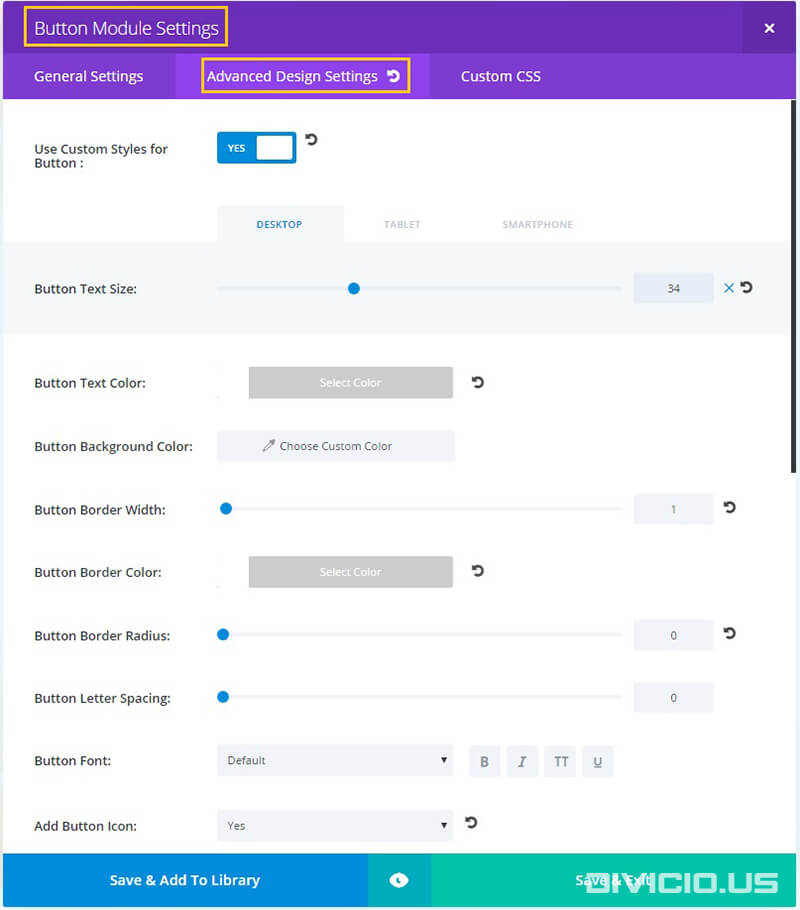
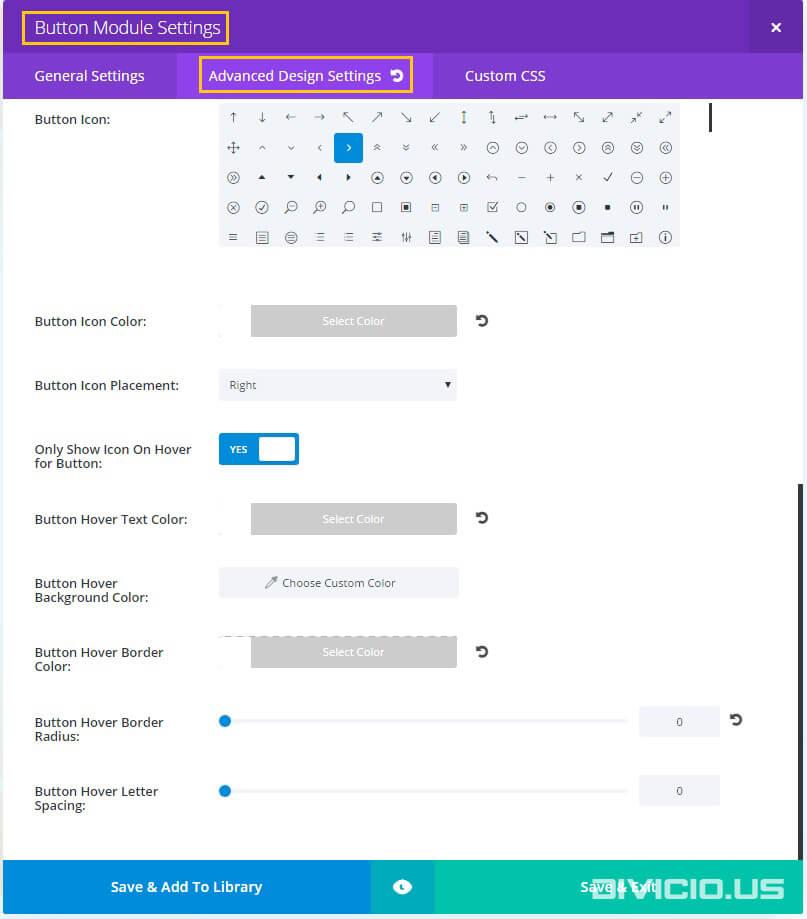
Step 2:
Add the animated_border CSS class to Button Module Settings -> Custom CSS -> CSS Class field like it is shown in the screenshot below.
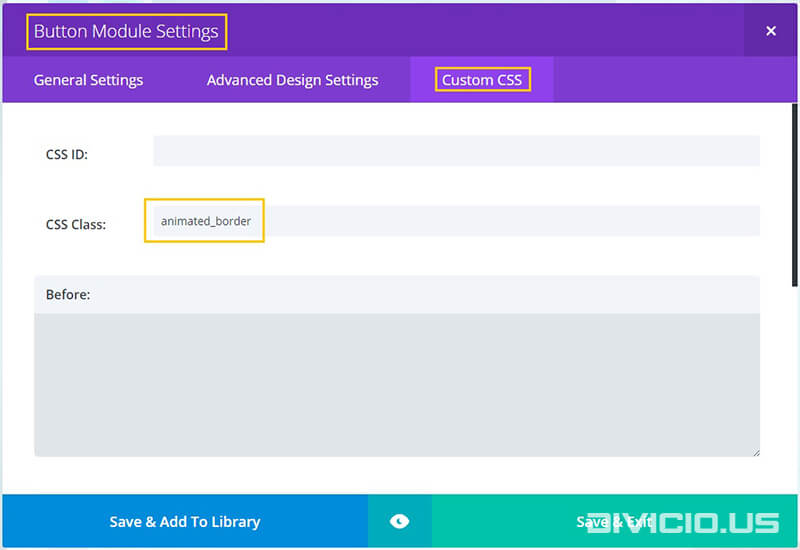
Step 3:
Here is the CSS code snippet for the animated border effect:
/* Animated border effect */

.animated_border span {
  position: absolute;
  -moz-transition-property: all;
  -o-transition-property: all;
  -webkit-transition-property: all;
  transition-property: all;
  -moz-transition-duration: 0.2s;
  -o-transition-duration: 0.2s;
  -webkit-transition-duration: 0.2s;
  transition-duration: 0.2s;
  -moz-transition-timing-function: ease-out;
  -o-transition-timing-function: ease-out;
  -webkit-transition-timing-function: ease-out;
  transition-timing-function: ease-out;
  z-index: 1;
}

@media all and (max-width: 980px) {
   .et_pb_button.animated_border:after {
      line-height: 1.7em !important;
   }
}

.animated_border .border {
  border: 1px solid #ffffff;
  top: 0;
  bottom: 0;
  left: 0;
  right: 0;
}
.animated_border .top, .animated_border .bottom, .animated_border .left, .animated_border .right {
  background-color: #ffffff;
  height: 1px;
  width: 0;
}
.animated_border .left, .animated_border .right {
  height: 0;
  width: 1px;
}
.animated_border .top {
  top: -5px;
  left: -15px;
}
.animated_border .bottom {
  bottom: -5px;
  right: -15px;
}
.animated_border .left {
  top: -15px;
  right: -5px;
}
.animated_border .right {
  bottom: -15px;
  left: -5px;
}
.animated_border:hover .border {
  top: -5px;
  bottom: -5px;
  left: -5px;
  right: -5px;
}
.animated_border:hover .top, .animated_border:hover .bottom {
  width: 100%;
}
.animated_border:hover .left, .animated_border:hover .right {
  height: 100%;
}
.animated_border:hover .top {
  left: -5px;
}
.animated_border:hover .bottom {
  right: -5px;
}
.animated_border:hover .left {
  top: -5px;
}
.animated_border:hover .right {
  bottom: -5px;
}

/* End animated border effect */
Copy the animated border effect CSS code snippet above and add it into the Divi -> Theme Options -> General -> Custom CSS field.

Step 4:
And here is the JS code snippet for the effect. It adds additional markup inside the button <a> tag.
<script type="text/javascript">
(function($) {

    $('a.animated_border').prepend('<span class="border"></span><span class="top"></span><span class="right"></span><span class="bottom"></span><span class="left"></span>');

})(jQuery);
</script>
Copy the JS code snippet above and add it into the Divi -> Theme Options -> Integration -> Add code to the < body > field.

That’s all, hope you’ll like this effect. Feel free to share your thoughts and suggestions below and don’t forget to share this post with your friends! ;)
Inspired by: Stylish CSS3 animated button



Hi Ivan do you know of a way to add an html code to the divi button module. I used the code above to create a nice looking button but now I want to add an html code for an online menu and can’t seem to be able to figure it out. Any help would be great.
Thanks
Amit
Hi Amit,
one of the ways to add HTML to Divi button module(or any other element on page) is by using jQuery append(), prepend(), appendTo() and prependTo() functions. All these functions do it in a slightly different way, in this tutorial I’ve used the
prepend()function to addspanelements to button(please check the JS part of this tutorial to see the implementation) but you can do some research to see which of them suits best your needs(I’ve included links to jQuery API docs).Hope this helps.
Is there a way to make a simple button with the inside border like these LEARN MORE buttons on dhgroup.com?
Thanks! I got yours to work, but need something simpler and have struggled to make it work in the custom.css
Hi SDA.
Sorry for late reply. Yes, you can make such buttons using the same technique used in this tutorial. The difference is that you only need to add the
spanhaving theborderclass (check the jQuery part of the tutorial), just remove the ones having thetop,right,bottomandleftclasses. And then use this simple CSS:.animated_border .border {position: absolute;
border: 1px solid #ffffff;
top: 5px;
bottom: 5px;
left: 5px;
right: 5px;
}
and also add this CSS to make the border thicker on hover:
.animated_border:hover .border {border-width: 3px;
}
This should work.
Hi. Thank you for this. I am struggling to get it working on the site I am working on. I have checked everything but the effect is not working on hover. Please help! Tx!
Hi Saretha. Sorry about that, most probably the problem occurs due to the JS code snippet. I’ve fixed it, copy it again, now it should work.